PRODUCT / CHECKOUT

A checkout built for the morning queue.

Scan, total and take payment in a few taps. Big buttons, clear totals and a screen your Saturday staff will pick up in minutes.

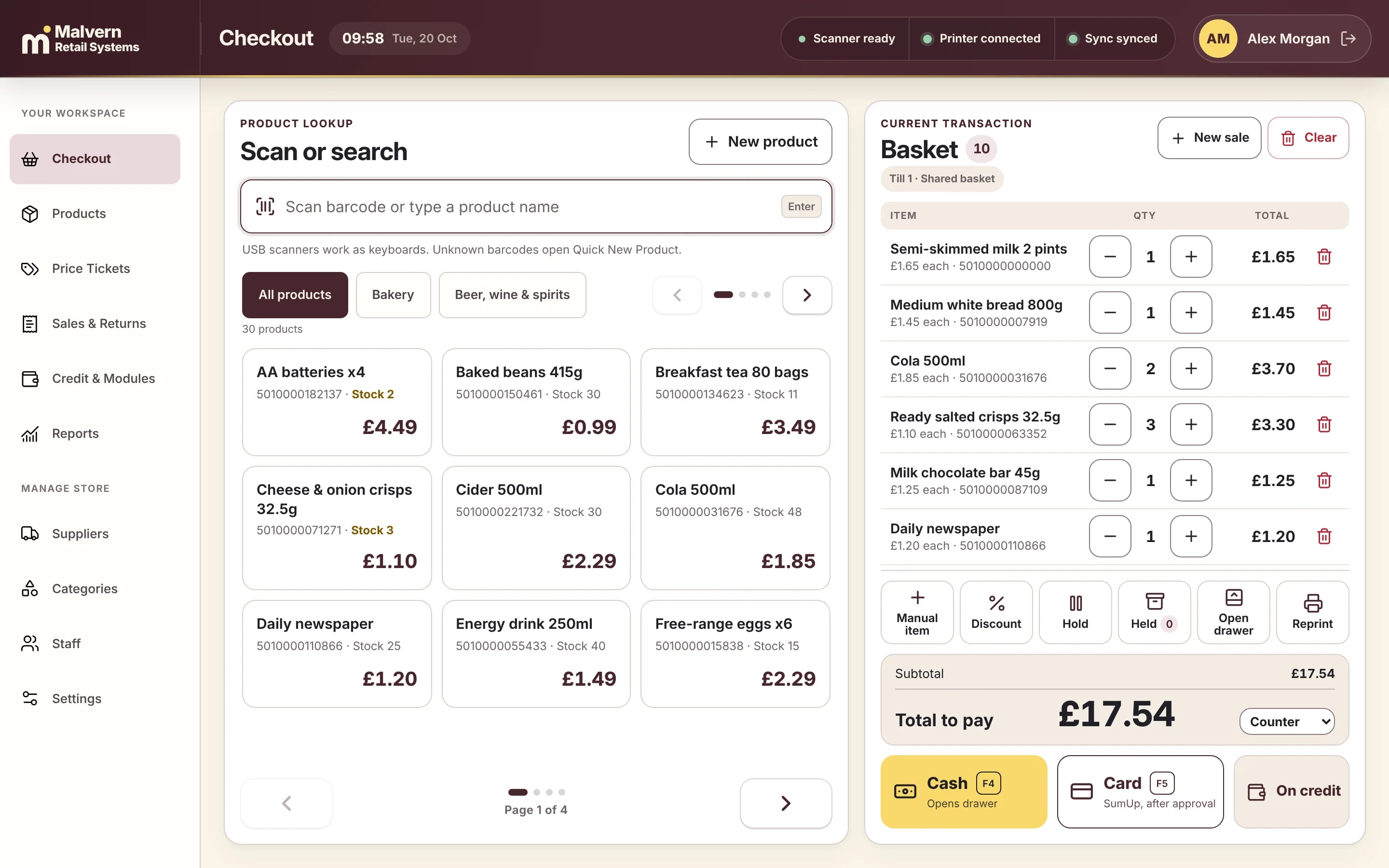
Malvern POS checkout screen with a basket of everyday shop items totalling £17.54 and cash, card and on-credit payment buttons
Malvern POS, shown with demo shop data.
IN DETAIL MALVERN RETAIL SYSTEMS
01

Scan, search or tap

Any USB barcode scanner works straight away. No barcode? Search by name or tap a product tile by category. An unknown barcode opens a quick new-product form.

02

Cash, card or on account

Cash opens the drawer and shows the change due. Card sales are confirmed once your existing terminal approves them. Regular customers can buy on account and settle up later.

03

The awkward moments, handled

Hold a sale while a customer fetches something, add a manual item, apply a discount, reprint a receipt or refund with manager approval.

04

Tested on your counter before go-live

Before switchover we run your own checklist on your own hardware: sales, receipts, refunds, cash-up and what to do if anything misbehaves.

THE NEXT STEP

See it working for a shop like yours.

A short demo, with products like yours and straight answers. No sales script.
Book a demo