PRODUCT / STOCK

Know what is on the shelf.

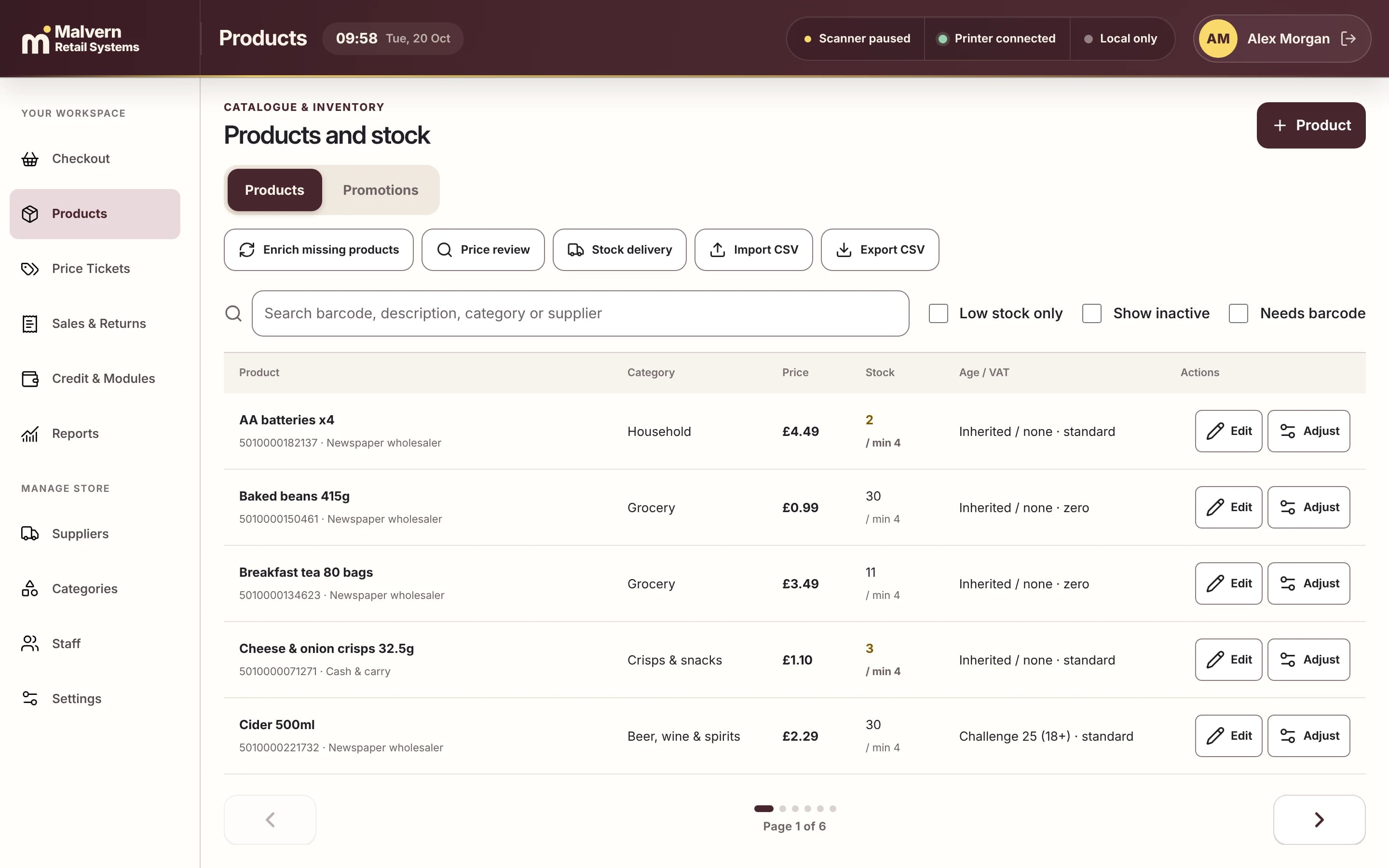
Products, prices, barcodes and stock levels in one tidy list, with low-stock flags, supplier records and CSV import so nobody types the catalogue in by hand.

Malvern POS products and stock list with barcodes, categories, prices, stock levels and low-stock warnings
Malvern POS, shown with demo shop data.
IN DETAIL MALVERN RETAIL SYSTEMS
01

One list, properly organised

Search by barcode, name, category or supplier. Filter to low stock, inactive lines or products with no barcode, then fix them in a couple of clicks.

02

Deliveries and adjustments

Book in a delivery, adjust a count or run a price review from the same screen, so the till always reflects what is really on the shelf.

03

Bring your catalogue with you

Import products from a CSV file and export them again whenever you like. We help check and tidy the data before switchover, so day one starts clean.

THE NEXT STEP

See it working for a shop like yours.

A short demo, with products like yours and straight answers. No sales script.
Book a demo